
InterBalance user guide
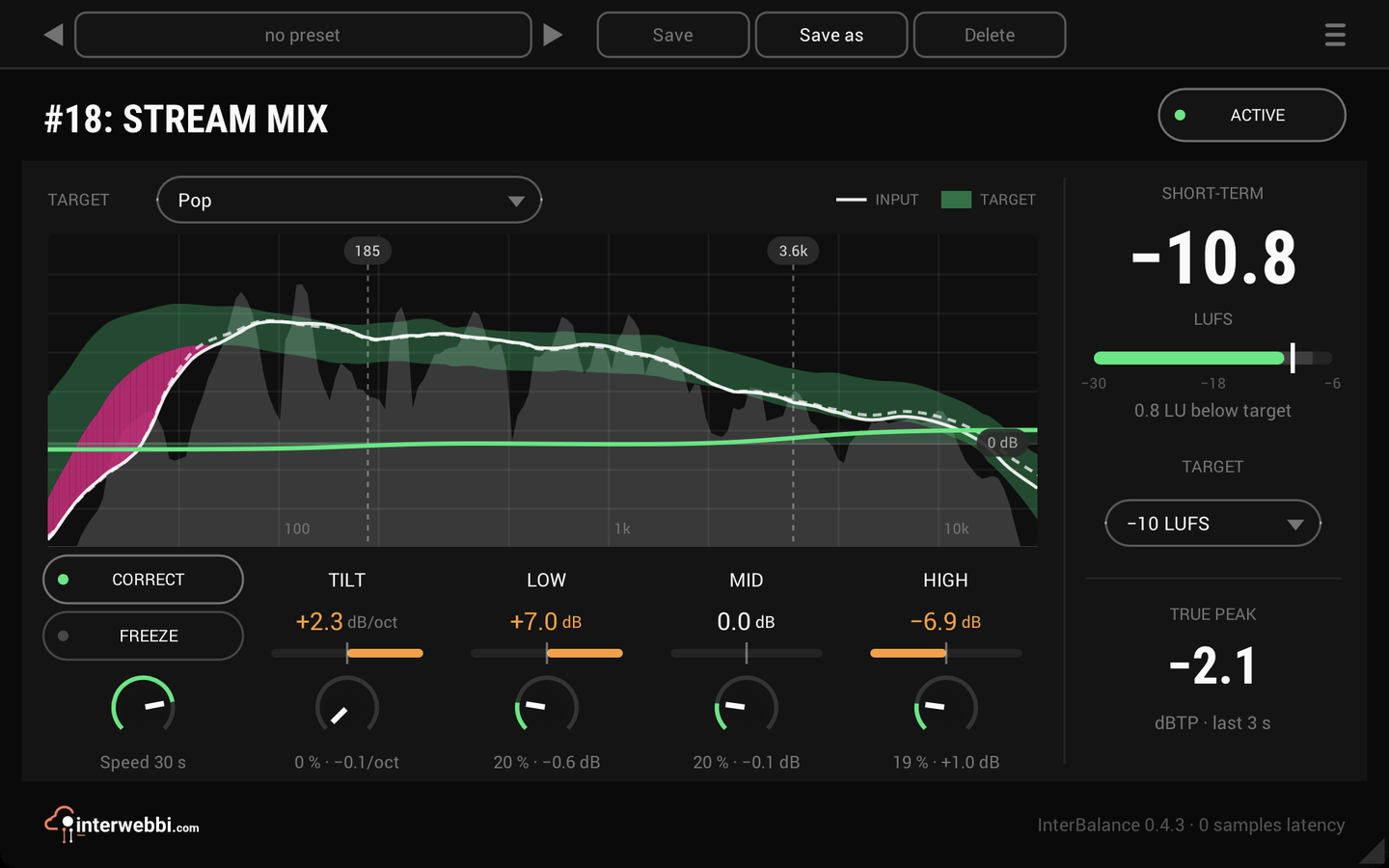
Every control, from the target and the spectrum on the left to loudness on the right. A freshly inserted InterBalance measures and shows, with CORRECT off, and changes nothing until you switch CORRECT on.
Active
On by default
ACTIVE in the header is a true bypass: off, nothing is measured or analysed, so InterBalance costs next to nothing, the track passes untouched and the panel dims with its last readings held. Back on, CORRECT carries on where it was, so ACTIVE works as an A/B.
Target
Balanced by default
The chip above the spectrum picks the tonal target. Balanced is the neutral line of pink noise; Dance, Metal, Pop, Rock and Schlager are each measured from a set of released tracks and averaged, and the faint band around a genre target is how much those tracks differ. This is a first set, to be measured again from more tracks.
Learn from input takes the mix as it sounds now as the target: click to start, at soundcheck or in the first song, and click again to finish after 15 seconds at least. Learn from reference file measures a whole WAV, AIFF, MP3 or FLAC file, on its loud parts only. Save target keeps one of your own for any project; your saved targets are listed in the same menu and can be deleted from it. The target is saved with the project and in presets.
Spectrum
Fine, medium or smooth · smooth by default
The target is the band in your track's colour and your mix the white line over it, averaged over about three seconds. Where the mix leaves the band the gap is tinted. The finer grey fill under the line follows the music over about 0.3 seconds. ☰, Resolution sets how smooth the line and the target are.
Crossovers
60 to 800 Hz, 200 Hz by default · 400 Hz to 6 kHz, 2 kHz by default · 1.5 to 16 kHz, 6 kHz by default
Drag the three tabs in the spectrum to move where LOW, LO-MID, HI-MID and HIGH meet, and double-click one to put it back. CORRECT's bands follow the same split.
Tilt and the bands
Averaged over about 10 s
How far the mix is from the target: TILT in dB per octave, the four bands in dB, white when close and amber when not. Too much bass reads mostly as LOW; a mix leaning dark or bright everywhere reads as TILT.
A band with nothing in it, like the bass in a breakdown or in a song that never had any, dims and reads HELD. CORRECT leaves that band where it was until it returns, and TILT goes on from the bands that remain.
Correct
Off by default
Moves the mix's balance toward the target, slowly and broadly: a tilt, a low shelf, a high shelf and two wide bells in the mids, one in each mid band, never more than 6 dB anywhere. Too much bass is cut and too little boosted, with the mids and highs all but untouched. It listens to the input, holds still through quiet passages and between songs, and adds no latency.
While it works, its own curve is drawn in the spectrum around a 0 dB line two thirds of the way down, and the value under each amount knob says what it is doing now. It has no make-up gain, so compare it with bypass at matched loudness.
Amounts
0 to 100% · 50% by default
The TILT, LOW, LO-MID, HI-MID and HIGH knobs under their readouts set how much of each difference CORRECT takes away.
Speed
2 to 60 s · 15 s by default
How long CORRECT takes to settle on a change.
Freeze
Off by default
Holds the correction where you are happy with it: the curve stops moving and its tag reads FROZEN, while the readouts and the meter go on following the music. The amount knobs still trim a frozen correction; SPEED does nothing. Unfreeze, and it carries on from there. FREEZE and the frozen correction are saved with the project and in presets, and can be automated.
Short-term
The last 3 s, EBU R128
The loudness of the last three seconds, updating by itself with no reset. Within 2 LU of the target the number is white, further away amber, and the line under the meter says how far off it is.
Loudness target
-36 to -6 LUFS · -14 LUFS by default
Pick -14, -16 or -23 LUFS from the chip under the meter, or type a value of your own. It can be automated, and is saved with the project.
True peak
The last 3 s
The highest true peak of the last three seconds, in dBTP, red above -1 dBTP.
Presets and the menu
The preset bar across the top saves, loads, steps through and deletes presets, in any host. The menu (☰) has the resolution, the window sizes, the track colour as the accent in REAPER, the licence and the update check, which asks at most once in ten minutes and never installs anything.