
InterComp user guide
Every control, left to right. A freshly inserted InterComp barely touches the track: both stages start at their gentlest, so nothing much happens until you turn a knob.
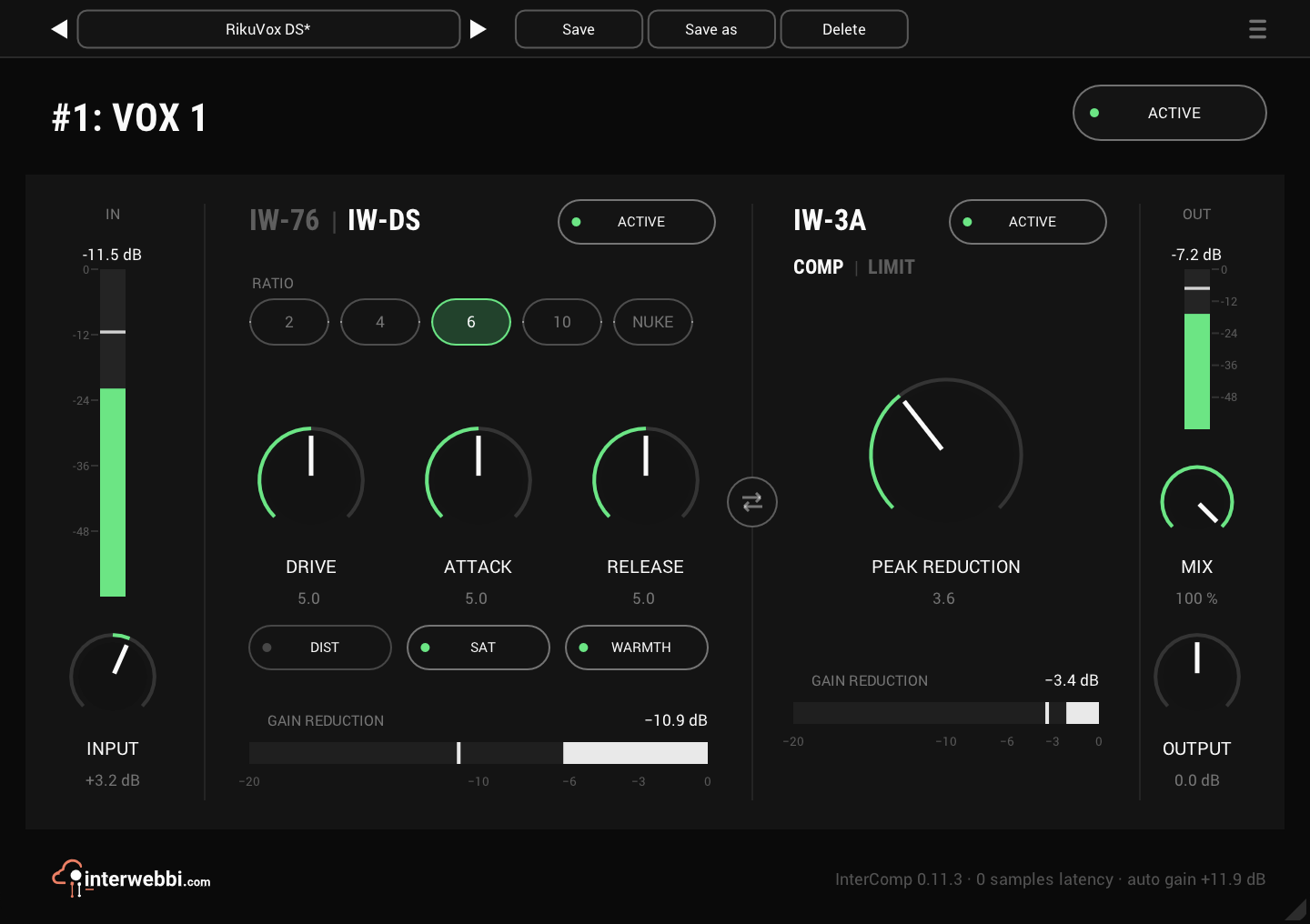
Input
−18 to +18 dB, default 0 dB
The input meter shows the input level. INPUT trims the level into both stages at once, for a hotter or quieter source. Auto gain takes it back afterwards, so it changes how hard the stages work, not how loud the result is.
IW-76
Ratio 4, 8, 12, 20, All · Drive −24 to +36 dB, default −24 dB · Attack, release 1 to 7
The fast stage, for catching peaks and adding bite. RATIO is a row of buttons; All is every button in at once. DRIVE sets how hard it compresses and how much colour it adds, without changing the level after the stage.
ATTACK and RELEASE are numbered 1 to 7, 7 the fastest, as on a 76. Each stage has its own ACTIVE pill and a white gain reduction meter.
IW-DS
Ratio 2, 4, 6, 10, NUKE, default 6 · Drive, attack, release 0 to 10
The first stage can be IW-76 or IW-DS, the thicker one, with more colour, from gentle levelling to all-out squash. Click the dim name in the stage's title to switch. It crossfades, so you can switch while playing, and each keeps its own settings, so you can compare them.
2 is the gentlest ratio, for levelling a vocal before IW-3A; NUKE is the brick-wall setting. DRIVE keeps the output level, as IW-76's does. ATTACK and RELEASE are fastest at 0. DIST adds warm second-harmonic distortion, SAT adds saturation, thicker in the low end, and WARMTH softens the top.
Order
IW-76 then IW-3A by default
The swap button between the stages reverses the order: IW-3A levels first and the fast stage catches what's left. You can swap while playing; it crossfades. Each stage keeps its settings.
IW-3A
Peak reduction 0 to 10, default 0 · COMP or LIMIT, default COMP
The optical stage, for smooth levelling. PEAK REDUCTION sets how hard it works.
COMP | LIMIT under its title switches the mode: click the dim word. LIMIT has the same threshold but holds peaks down much harder, at roughly 6 to 9:1 instead of about 4:1, and lets go a little faster. The switch crossfades, so it works while playing, and auto gain follows the mode.
Mix and output
Mix 0 to 100%, default 100% · Output ±24 dB
MIX blends the dry signal with the compressed one, for parallel compression without a send: 100% is all compressed, 0% all dry. OUTPUT trims the result, after auto gain and MIX. The output meter shows the output level.
Auto gain
On by default
Keeps the output about as loud as the input, so you hear the compression and not a level change. It is set from the knobs, not from the music, so it changes only when you turn one and never pumps. It is set for a vocal around −18 dBFS RMS: a hotter or quieter source comes out a little louder or quieter than it went in. Switch it in the settings menu on the preset bar; the footer shows how much makeup gain it is adding.
Active, presets
ACTIVE in the header bypasses the whole plug-in. Each stage's own ACTIVE switch bypasses just that stage. It keeps running while bypassed, so it comes back in without a jump.
The preset bar across the top saves, loads, steps through and deletes presets. A preset saves every setting, and a star after its name shows you've changed something since.