
InterMaster user guide
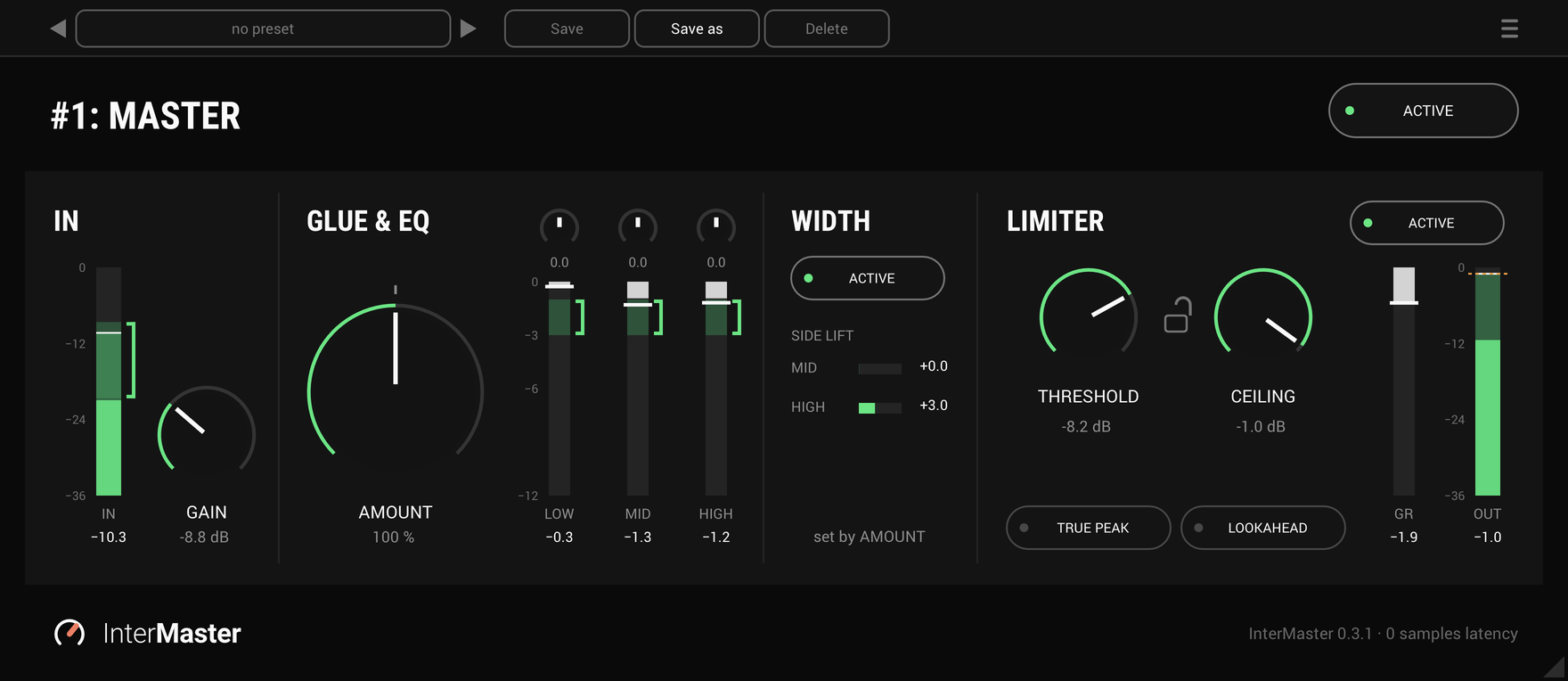
Every control, from IN on the left to LIMITER on the right, in the order the signal takes. A freshly inserted InterMaster has AMOUNT at 100%, the EQ at 0.0, WIDTH and LIMITER on, and TRUE PEAK and LOOKAHEAD off, so it adds no latency.
Active
On by default
ACTIVE in the header switches the whole plug-in on and off, for a quick comparison with the mix as it was.
Gain
-24 to +24 dB · 0 dB by default
The level into the EQ and GLUE. Set it so the input meter's RMS sits in its bracket. The range is wide enough for a quiet stream mix to reach the bracket as well as a hot PA mix.
The input meter
-36 to 0 dB · after GAIN
The RMS is the solid bar and the peak the paler one above it, with a held peak line and the held peak's number under the meter.
The bracket beside it is where to land the RMS: where GLUE was tuned to work at the AMOUNT you've set. At 100% that is about -21 to -9 dB RMS, and it moves as AMOUNT turns.
Amount
0 to 200% · 100% by default
The one knob of GLUE: turn it up and the mix pulls together and gets fuller, and opens up with it. Underneath are three bands: a slow leveller on the bass, a smooth glue on the mids and a fast tamer on the highs, each with a little saturation. The mark at 100% is the place to start; above it the mix gets denser and wider, below it lighter.
At 0% GLUE is switched out and the input passes untouched, with no CPU spent. Turning AMOUNT away from 0, or back to it, crossfades so nothing clicks.
To get to zero latency, GLUE shifts the phase a little, so above 0% it won't null against the dry mix, though its level stays the same. Turn AMOUNT down rather than blending it in parallel.
EQ
LOW, MID and HIGH · 0.0 by default
Three small knobs over GLUE's meters, before GLUE, so GLUE hears what they do. LOW is a shelf at 30 Hz with a dip near 400 Hz, up to 9.8 dB either way. MID is a peak or a dip at 500 Hz, up to 6 dB either way. HIGH is a lift at 12 kHz with a dip near 10 kHz, up to 6 dB either way.
Each knob is off at its centre and reads 0.0 there. Halfway to the right is a gentle setting (LOW +1.1 dB, MID +3.0, HIGH +1.0), and the rest of the travel goes on to the most it gives. Left mirrors right, so a knob turned left undoes what it does turned right. Double-click returns a knob to 0.0, and the value under it can be clicked and typed into.
The input meter reads before the EQ, so turning the knobs does not move it. The EQ adds no latency.
GLUE's meters
Each with its bracket
How hard GLUE is working in the low, mid and high part of the mix. Each meter has a bracket where it should sit, and the number under it holds the most it has shown.
Width
Set by AMOUNT · on by default
WIDTH has no knob: AMOUNT sets how far the mix opens up, and the bars show how much. It stays mono-compatible at any setting.
ACTIVE under its name turns it off. On a mono track the section reads "mono track: nothing to widen".
Limiter active
On by default
Switched off, LIMITER is bypassed and costs no CPU, and the OUT meter keeps showing the output.
Threshold
-30 to 0 dB · 0 dB by default
Where limiting starts. Pull it down to limit harder. Release is automatic.
Ceiling
-30 to 0 dB · -0.3 dB by default
The most that comes out. It is the plug-in's output level, which is why there is no OUT knob.
The lock
Off by default
Between THRESHOLD and CEILING. Locked, the two move together, so you can limit harder without getting louder.
True peak
Off by default
Holds the ceiling on inter-sample peaks too, the ones a D/A converter can produce between samples. It turns LOOKAHEAD on to do it, which the panel shows as "held by TRUE PEAK" above LOOKAHEAD.
Lookahead
Off by default · 1.5 ms when on
Puts the gain in place 1.5 ms before each transient arrives, 72 samples at 48 kHz. InterMaster reports it to the host, which compensates, and the footer shows the latency in amber. Without it, the limiter catches each peak, holds for 2 ms and lets go over 10 ms, so nothing clips.
GR and out
GR 0 to 12 dB · OUT -36 to 0 dB
LIMITER's gain reduction, and the plug-in's output meter, with the held peak under each.
Presets and the menu
The preset bar across the top saves, loads, steps through and deletes presets, in any host. The menu (☰) has the accent colour, the window size, the licence and the update check, which never installs anything. The values under GAIN, AMOUNT, the EQ's knobs, THRESHOLD and CEILING can be clicked and typed into.