
InterStream user guide
Every control, NDI® on the left and SRT on the right. A freshly inserted InterStream sends the track as an NDI feed named after it, with SRT off, and leaves the track itself exactly as it was.
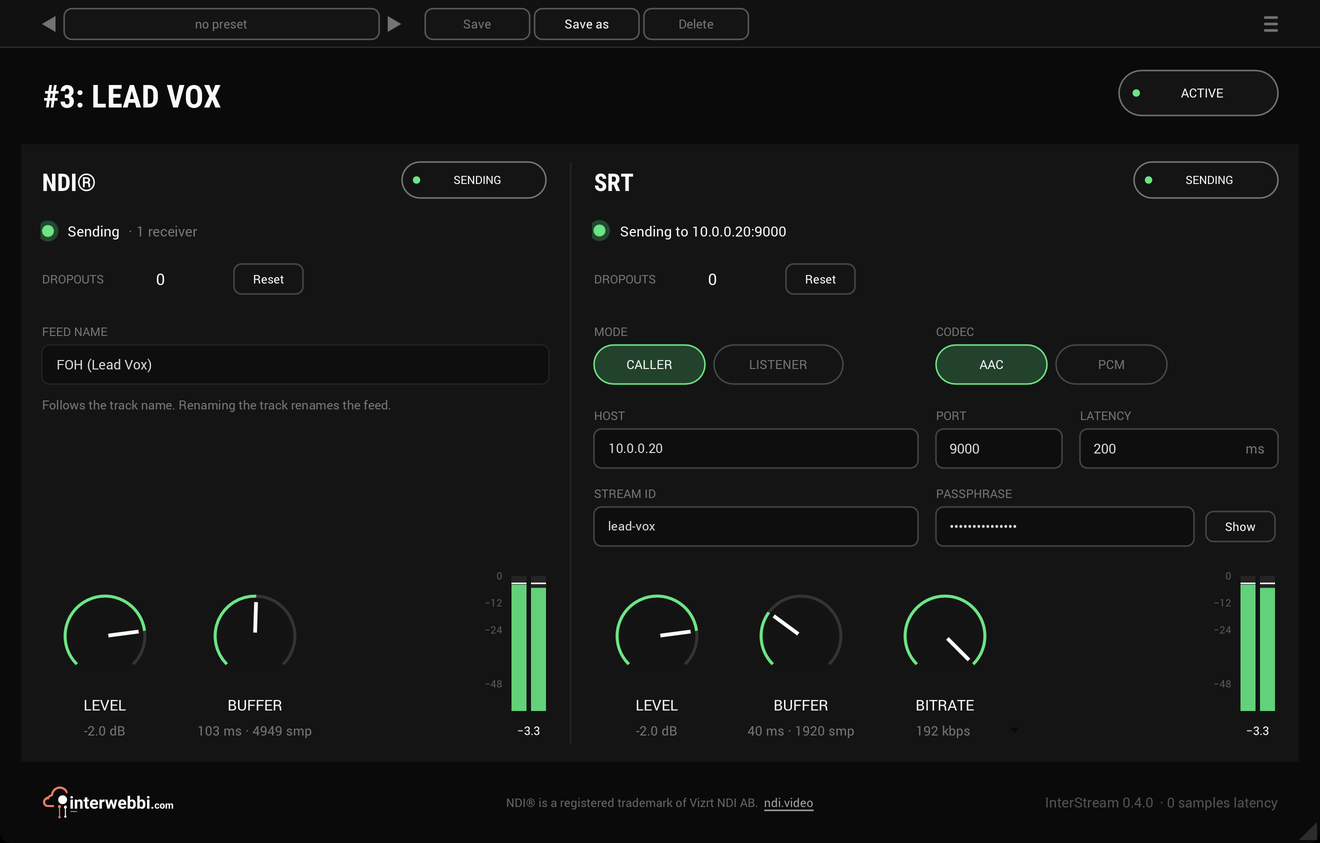
Active
On by default
ACTIVE in the header switches InterStream off. Off, both feeds stop and receivers lose the source, and every control dims; back on, the feeds reconnect. The track's own audio passes exactly as it always does, on or off.
NDI
On or off · on by default
Sends the track as a full-bandwidth NDI® audio feed at the session's own sample rate and channel count. The line under it says what the feed is doing: Starting, Sending with the number of receivers, or why it can't send. Zero receivers just means nobody has picked it up yet.
It is always full NDI, never NDI HX.
Feed name
The track's name
The feed is named after the track, and NDI shows it as the computer's name followed by the track's, FOH (Lead Vox). Rename the track and the feed is renamed too, and every receiver taking it loses it, since receivers find a feed by its name. With no track name from the host, the feed is called InterStream.
If two feeds on one computer would share a name, from two InterStreams or another program, the second goes out numbered, Lead Vox 2, and the panel says so. When the session is reopened those two can swap, so give each track its own name.
SRT
On or off · off by default
Sends the track as an MPEG-TS stream over SRT. The line under it says what it is doing: calling a host, waiting for a receiver, sending to whom, or why it cannot.
Mode
Caller or listener · caller by default
CALLER calls a receiver at HOST and PORT, such as InterDirector's SRT input, a relay or a truck, and calls again every two seconds until it answers, and again whenever the connection drops. LISTENER waits on PORT for one receiver to call in, such as OBS; it opens a port on this computer, so the firewall may ask first. A listener with a STREAM ID set takes only a receiver that presents it.
Codec
AAC or PCM · AAC by default
AAC comes from the computer's own encoder, at the bitrate the BITRATE knob sets: 96, 128, 160 or 192 kbps, or AUTO, which is 192 for stereo and 96 for mono. PCM is uncompressed 24-bit audio as SMPTE 302M, about 2.3 Mbit/s for stereo; a mono track goes out as two identical channels.
PCM always goes out at 48 kHz. AAC goes out at the session's rate when that is 44.1 or 48 kHz, and at 48 kHz from any other, resampled. AAC delays the feed by about 21 ms more, plus the encoder's own delay. The track itself is never delayed.
Host and port
Port 1 to 65535 · 9000 by default
Where a caller sends. A listener waits on PORT on every interface. Paste a whole srt:// address into HOST, such as InterDirector shows, and the port, stream ID, passphrase and latency it carries are filled in; the rest stay as they are.
Latency
20 to 8000 ms · 200 ms by default
How long SRT waits to resend lost packets. On a local network the default is plenty; over the internet, set it to about four times the round-trip time. SRT uses the larger of the two ends' values.
Stream ID and passphrase
Optional
STREAM ID is what a caller presents and what a listener asks for. A PASSPHRASE switches on AES-128 encryption; hold Show to read it. Both are saved with the session, so a live session opens ready to send, which also means they are stored as plain text in the project file and in any copy of it. A preset keeps where an output sends but never the passphrase.
Level
-60 to +12 dB · 0 dB by default
Each output's own level, applied to what it sends and never to the track. At the bottom of the knob it reads -inf and sends silence. The meter beside it shows the level going out.
Buffer
10 to 1000 ms · 40 ms by default
Each output's buffer between the track and the network, with its length in samples beside it. The host processes audio in bursts, and the clocks of the audio interface and the computer drift apart; the buffer evens both out, so the feed goes out at a steady pace. A bigger buffer rides out more, and adds that much delay to the feed. If it overflows, the oldest audio is dropped and counted as dropouts; a gap goes out as silence, never a repeat.
Dropouts
Held until reset
Audio that could not go out in time, counted for each output and held until you press Reset. The track never waits for the network, so a dropout costs the feed, never the show.
When the host stops
When the host stops processing audio, the feeds keep sending silence, so receivers stay connected. An offline render never reaches the network: while one runs, the feeds carry silence.
Presets and the menu
The preset bar across the top saves, loads, steps through and deletes presets, in any host. The menu (☰) has the window sizes, the track colour as the accent in REAPER, the licence, NDI's notice and the update check, which asks at most once in ten minutes and never installs anything.