
InterTape-delay user guide
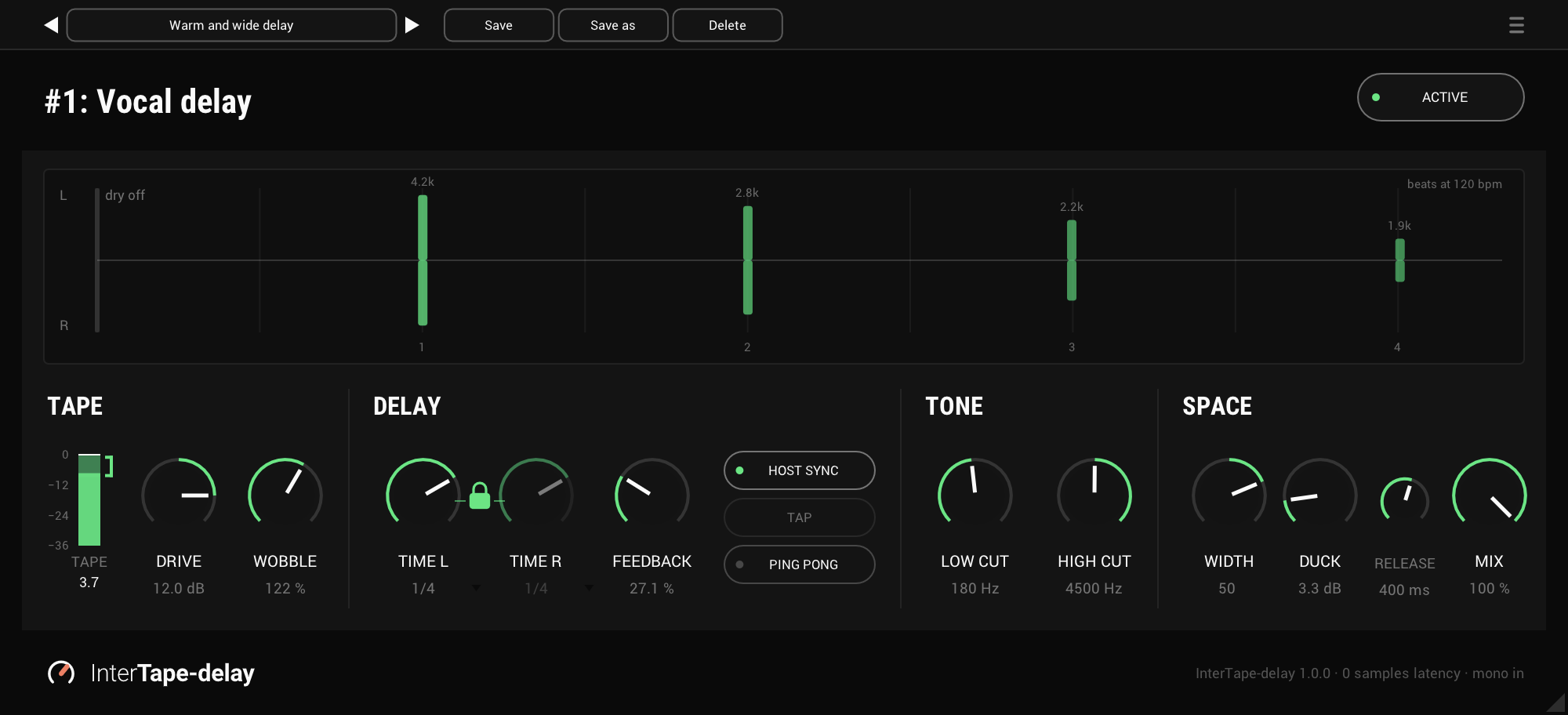
Every control, from the repeats display at the top to MIX on the right. A freshly inserted InterTape-delay has TIME at 1/4 in time with the host and locked, FEEDBACK at 30%, WOBBLE at 100% and MIX at 100%, the repeats alone, with everything else off.
Active
On by default
ACTIVE in the header switches the whole plug-in on and off. Off, the signal passes exactly as it came in.
Input
In the menu (☰) · auto by default
Input: auto decides mono or stereo from the channels when the audio starts, and holds it. After 2 seconds of silence it decides again. Input: stereo keeps the repeats' own stereo image. Input: left channel only feeds the left channel to the tape and the delay, for a stereo track that carries one mic, and the dry passes as it came.
The input is set per instance and is not saved in presets. The footer shows which one is in use.
The repeats display
Across the top
The repeats your settings make, after the dry hit at the left: the left side's above the line and the right side's below. A bar's height is how loud that repeat is, and its colour fades as it gets darker. The first few show where HIGH CUT has taken them, in kHz.
It is drawn from the settings, not from the audio, so you can set the echo up before anything plays. The bars glide when you change the time.
The tape meter
-36 to 0 dB · at the tape
The level hitting the tape, after DRIVE: the RMS solid, the peak above it, and the held peak in numbers under it. The bracket is where the tape starts to saturate, from a gentle rounding at its bottom to a hard push at its top.
Drive
-18 to +18 dB · 0 dB by default
How hard the tape is driven. The output always moves the other way by the same amount, so the level stays put while the colour changes. The tape colours the signal on its way into the delay, and every repeat carries that colour.
Wobble
0 to 200% · 100% by default
The tape's wow and flutter in one knob: a fast shimmer in the pitch and the level of the repeats. 100% is gentle, 200% twice as much, and 0% holds them steady.
Time L and time R
A note value, or 1 to 2000 ms · 1/4 by default
With HOST SYNC on, each is a note value from a 1/64 triplet to a whole note, dotted and triplet included: click the value to pick one from the list. With it off, each is a time in milliseconds, turned, typed or tapped. The delay holds up to 6 seconds, and a longer note is held to that.
Change the time and the repeats glide to it: the pitch bends as a tape motor speeds up or slows down, and settles over a moment, longer for a longer time.
The lock
Locked by default
Between TIME L and TIME R. Locked, TIME R follows TIME L and is shown faded. Open it to set the two apart; locking it again brings TIME R back to TIME L.
Feedback
0 to 95% · 30% by default
How much of each repeat comes round again. The first few repeats stay up and the tail falls away faster, so you hear the first ones clearly without setting it high. At 0% there is a single repeat.
It stops at 95%, and a held note cannot build into a howl: repeats that rise above what was sung are turned down.
Host sync
On by default
TIME L and TIME R follow your session's tempo as note values. Switched off, they are milliseconds. Each side keeps its note and its time apart, so switching back finds what you had.
Tap
Dimmed while HOST SYNC is on
Tap it in time and the delay takes the average of your last four taps. A pause of more than 2 seconds starts over. It flashes on each tap.
TAP is also a parameter your host can learn, so a footswitch can tap the time during a show. With the lock open, both times move and keep their ratio.
Ping pong
Off by default
The repeats bounce: the first on the left after TIME L, then the right after TIME R, then the left again. The input goes in as one, so a stereo source bounces too. The repeats come in equal pairs, so the echo sits in the middle instead of leaning to the side that starts.
Low cut and high cut
LOW CUT off to 2 kHz · HIGH CUT 1 kHz to off · both off by default
They set the first repeat, and every repeat after it is thinner and darker than the one before, so the echo moves away from you. Even with both off, each repeat loses a little of its top, as it would on tape. HIGH CUT is gentle and LOW CUT steeper, which also keeps low end from piling up at high FEEDBACK.
Width
-100 to +100 · 0 by default
InterSilica's width, working on the repeats alone, so the dry is never touched. Right widens them and left narrows them towards mono. On a mono vocal it spreads the repeats from nothing. A mono fold-down loses no level at any setting.
Duck and release
DUCK off to 24 dB · RELEASE 50 to 2000 ms, 400 ms by default
DUCK is how far the repeats drop while the dry plays. It listens to the voice against its own recent peak, so it works whatever the input level and catches quiet words too, and it holds briefly between syllables. RELEASE is how fast the repeats come back once you stop.
What goes round the loop is never ducked, so the tail comes back whole.
Mix
0 to 100% · 100% by default
100% is the repeats alone, for an aux return. Up to 50% the repeats come up with the dry at full, so 50% on an insert sounds like an aux at 0 dB beside the dry. Past 50% the dry falls away.
Presets and the menu
The preset bar across the top saves, loads, steps through and deletes presets, in any host. Factory presets, at the top of its list, has Warm and wide delay and Ping and pong: they set the sound and keep your accent colour and window size. The menu (☰) has the input, the accent colour, the window size, the licence and the update check, which never installs anything. Every value under a knob can be clicked and typed into, and a note value opens its list.